NOTE: Install according to order given
First Install Netframework:
Net framework 2.0
Download
HP Quick Launch Buttons
Download
INTEL CHIPSET:
INF Update Utility - Primarily for Intel® 5, 4, 3, 900 Series Chipsets
Download (intel website)
Download(mediafire)
Intel matrix storage manager:
Download (intel site)
Download (mediafire)
GRAPHIC
if you have intel graphic:
Mobile Intel 45 Express Chipset Family Graphics Driver
Intel graphic accelerator 4500MHD
Download
If you have Nvidia graphic:
NVIDIA GeForce G 103M/ G 105M Graphics Driver (186.81 WHQL XP 32-bit)
Download
FOR NVDIA: if resulting in error use modded driver below:
Download
3-step process to install:
1. Download driver, double click and select extract,
2. Download modded INF and replace original INF in extracted folder,
3. Install and reboot.
===============
AUDIO:
===============
Install MS-UAA first:
both ms-uaa sp33867 and kb888111 are similar files.
Windows XP SP2: Download (SP33867.exe)
Download (KB888111)
Windows XP SP3: Download (KB835221)
Then restart, and install AUDIO Drivers:
IDT - High Definition Audio Codecs (SP39671)
Download (ftp)
Download (mediafire)
First install your audio.
Installing the Audio normally resulting in error, ignore it and proceed by manually install the drivers, read the guide here;
Manually install Audio Drivers.
High-Definition Audio (HDA) Modem Installer and Driver
Download
WIRELESS:
===========
Choose one of the wireless driver base on your specs, if you dont know, just try each driver (there are no risk and will not harm your system)
---------------------------------------------------------
Broadcom BCM9431HMG
Broadcom: Download
Intel: Download
(requires windows installer 3.0 installed first)
=================
HP Integrated Module with Bluetooth Wireless Technology
Download
HP Wireless Assitant:
Download
Realtek RTL8102E Family PCI-E Fast Ethernet NIC
Download(direct) or Download
CARD READER
JMB38X Card Reader Host Controller
Download
ALPS Touchpad
Download
Synaptics Touchpad
Download
Download
WEBCAM
Cyberlink youcam software 2.0
Download
LIGHTSCRIBE:
Lightscribe system software
Download
If you have 7 unknown device:
Unknown devices:
Download
Unzip files, open folder and right click at machine.inf, select install.

Saturday, January 23, 2010

Compaq Presario V2400 CTO Windows XP Driver
CHIPSET
Intel Chipset Installation Utility
Download
GRAPHICS
Mobile Intel 915GM/GMS, 910GML Express Chipset Family Driver
Download (direct)
Download
or
Intel 82852/82855 GM/GME Graphics Controllers Driver
Download
AUDIO
Conexant AC-Link Audio Driver
Download (direct)
Download
Software for Audio (EQUALIZER):
Conexant CX20468-31 AC97 Audio Driver EQ
Download
MODEM:
Conexant AC97 Soft Data/Fax Modem with SmartCP Driver
Download (direct)
Download
Conexant S/W FAX/V.90 56K Modem Driver
Download
Agere Systems AC'97 Modem Driver
Download
BUTTONS/ MOUSE:
Hp Quicklaunch Button:
Download (direct)
Download
Synaptic Touchpad:
Download (direct)
Download
Laser Mini Mouse:
Download (direct)
Download
WIRELESS:
If you have Broadcom Wireless:
Download (direct)
Download
If You have Intel Wireless: Download
Download (direct)
Download
Wireless Software-
HP Wireless Asistant:
Download (Direct)
Download
BLUETOOTH
Support Software for HP Integrated Module
with Bluetooth Wireless Technology
Download (direct)
Download
NETWORK ADAPTER:
Intel Pro Network Adapter:
Download (direct)
Download
Broadcom WLAN Network Adapters
Download (direct)
Download
REALTEK RTL8139/810x NIC Driver
Download (direct)
Download
CARD READER
Texas Instruments Media Card Reader Driver
Download (direct)
Download
LIGHTSCRIBE:
Lightscribe Host Software
Download (direct)
Download
HP Battery Check:
Download (direct)
Download
Intel Chipset Installation Utility
Download
GRAPHICS
Mobile Intel 915GM/GMS, 910GML Express Chipset Family Driver
Download (direct)
Download
or
Intel 82852/82855 GM/GME Graphics Controllers Driver
Download
AUDIO
Conexant AC-Link Audio Driver
Download (direct)
Download
Software for Audio (EQUALIZER):
Conexant CX20468-31 AC97 Audio Driver EQ
Download
MODEM:
Conexant AC97 Soft Data/Fax Modem with SmartCP Driver
Download (direct)
Download
Conexant S/W FAX/V.90 56K Modem Driver
Download
Agere Systems AC'97 Modem Driver
Download
BUTTONS/ MOUSE:
Hp Quicklaunch Button:
Download (direct)
Download
Synaptic Touchpad:
Download (direct)
Download
Laser Mini Mouse:
Download (direct)
Download
WIRELESS:
If you have Broadcom Wireless:
Download (direct)
Download
If You have Intel Wireless: Download
Download (direct)
Download
Wireless Software-
HP Wireless Asistant:
Download (Direct)
Download
BLUETOOTH
Support Software for HP Integrated Module
with Bluetooth Wireless Technology
Download (direct)
Download
NETWORK ADAPTER:
Intel Pro Network Adapter:
Download (direct)
Download
Broadcom WLAN Network Adapters
Download (direct)
Download
REALTEK RTL8139/810x NIC Driver
Download (direct)
Download
CARD READER
Texas Instruments Media Card Reader Driver
Download (direct)
Download
LIGHTSCRIBE:
Lightscribe Host Software
Download (direct)
Download
HP Battery Check:
Download (direct)
Download
Sunday, January 17, 2010
Compaq Presario CQ60-203TX Windows XP Driver
CHIPSET:
INF Update Utility - Primarily for Intel® 5, 4, 3, 900 Series Chipsets
Download (intel website)
Download(mediafire)
GRAPHIC:
=====================
If you have Nvidia Graphic
NVIDIA GeForce 9200M GE Graphics Driver:
Download
if you have intel graphic:
Mobile Intel 4 Series Express Chipset Family Graphics Driver (32-bit)
Download (mediafire)
==========================
AUDIO:
UAA drivers (Must be installed before installing the audio driver):
Download
Windows XP SP3: Download (KB835221)
after download , install MS-UAA, restart then download and install the following
Both Conexant Audio & Modem Driver:
Download (mediafire)
or
Download (rapidshare)
or
Download (easy-share)
after download, extract the folder and install both audio and modem, if failed read the instruction here:
Installing conextant smart audio 221 Windows XP
WIRELESS:
=======================
If you have intel wireless
Intel: Download
(requires windows installer 3.0 installed first)
If you have Broadcom Wireless
Broadcom: Download
========================
HP Wireless Assitant:
Download
HP Integrated Module with Bluetooth Wireless for Windows XP:
Download
CARD READER:
Realtek USB 2.0 Card Reader:
Download
or
Download
if the above drivers didn't work use this:
Download
ETHERNET:
Realtek RTL8101E Family PCI-E Fast Ethernet NIC
Download
WEBCAM:
(Automatically installed)
if not here is the drivers: Download
Net framework 2.0
(require before Quicklauch)
Download
HP Quick Launch Buttons
Download
TOUCHPAD
Download
Lightscribe system software
Download
SPECIFICATIONS:
INF Update Utility - Primarily for Intel® 5, 4, 3, 900 Series Chipsets
Download (intel website)
Download(mediafire)
GRAPHIC:
=====================
If you have Nvidia Graphic
NVIDIA GeForce 9200M GE Graphics Driver:
Download
if you have intel graphic:
Mobile Intel 4 Series Express Chipset Family Graphics Driver (32-bit)
Download (mediafire)
==========================
AUDIO:
UAA drivers (Must be installed before installing the audio driver):
Download
Windows XP SP3: Download (KB835221)
after download , install MS-UAA, restart then download and install the following
Both Conexant Audio & Modem Driver:
Download (mediafire)
or
Download (rapidshare)
or
Download (easy-share)
after download, extract the folder and install both audio and modem, if failed read the instruction here:
Installing conextant smart audio 221 Windows XP
WIRELESS:
=======================
If you have intel wireless
Intel: Download
(requires windows installer 3.0 installed first)
If you have Broadcom Wireless
Broadcom: Download
========================
HP Wireless Assitant:
Download
HP Integrated Module with Bluetooth Wireless for Windows XP:
Download
CARD READER:
Realtek USB 2.0 Card Reader:
Download
or
Download
if the above drivers didn't work use this:
Download
ETHERNET:
Realtek RTL8101E Family PCI-E Fast Ethernet NIC
Download
WEBCAM:
(Automatically installed)
if not here is the drivers: Download
Net framework 2.0
(require before Quicklauch)
Download
HP Quick Launch Buttons
Download
TOUCHPAD
Download
Lightscribe system software
Download
SPECIFICATIONS:
• Pentium Dual Core T3400 (2.16GHz) Processor
• 1 GB DDR-2 SDRAM (1 DIMM)
• 250GB 5400RPM Hard Disk
• Super Multi 8x DVD-RW Dual Layer Drive
• 16" HD Bright View Display (1366 x 768 resolution)
• Nvidia GeForce 9200M GE 256MB Graphics
• 10/100 LAN 56k V.92 Modem
• Wi-Fi 802.11b/g Bluetooth
• Built-in Webcam Microphone
• Touch Pad 5-in-1 Media Card Reader
• Free DOS Operating System
• 1 Year Warranty
• FREE HP Carrying Case
• 1 GB DDR-2 SDRAM (1 DIMM)
• 250GB 5400RPM Hard Disk
• Super Multi 8x DVD-RW Dual Layer Drive
• 16" HD Bright View Display (1366 x 768 resolution)
• Nvidia GeForce 9200M GE 256MB Graphics
• 10/100 LAN 56k V.92 Modem
• Wi-Fi 802.11b/g Bluetooth
• Built-in Webcam Microphone
• Touch Pad 5-in-1 Media Card Reader
• Free DOS Operating System
• 1 Year Warranty
• FREE HP Carrying Case
Dell XPS Studio 1340 Windows XP Driver
CHIPSET:
Nvidia NForce Chipset Driver 15.26
Dowload (nvidia website)
!! RESTART AFTER CHIPSET INSTALATION.
Nvidia High Definition Audio R202281 (nVidia MCP79)
Download (dell website)
Dowbnload (mediafre)
AUDIO:
IDT High Definition Audio Codec (XP Driver) - PIDT001
Download
If direct install failed:
Now go to the Device Manger (click start select run and type DEVMGMT.MSC)
Right click on the IDT Audio Driver (it should be in error)
Select Update Driver>No, not this time>Install from a list or specific location (Advanced)>Check include this location in the search>Browse to the folder you extracted the file to
and follow the path above to the XP folder.
CARD READER:
Ricoh Card Reader R5C833 R188094
Download (dell website)
Download (mirror mediafire)
Download (mirror ziddu)
WIRELESS:
Dell WLAN 1510 Wifi R202485
Download (direct)
Download (dell website)
Download (mediaifre)
ETHERNET:
nVidia Ethernet Controller Driver A00
Download (direct)
Download (mediafire)
TOUCHPAD
Synapstic Toucpad Driver
Download (direct)
Download (mediafire)
BLUETOOTH:
Dell Wireless 370 Bluetooth Mini-Card
Download
CIR:
IT1852 CIR Receiver (ITECIR)
Download (direct)
Download (mediafire)
WEBCAM
CREATIVE LABS INTEGRATED WEBCAM A06
Download (direct)
Download (mediafire)
WIRELESS:
Atheros 5211 Network Adapter
Download
Instructions:
1. Extract the files. (for new user recommended - copy the downloaded drivers files, add to desktop, right click select extract)
2. Open device manager, look at the network drivers with yellow, right click on it select update.
(to open device manager, click start, select run and type DEVMGMT.MSC and press enter.
3. no to connect.
3. select advance
4. select dont search, i will choose the drivers to install.
5.point to the extraxted driver folder.
6. Select the inf files.
7. continue with onscreen instructions.
GRAPHIC DRIVER:
Nvidia 9400M G
1. First obtain the drivers from laptopvideotogo,
http://www.laptopvideo2go.com/drivers/xp/190.40/disclaimer
2.There Scroll until you found link to download, Download both files:

3. So you will get 2 files which is 19040.exe and nv4_disp.inf:

4. Download and Install 7z: Download here: http://www.7-zip.org/download.html and install it.
5. Right click on the 19040.exe and select extract 7z - select extract files, then press ok.


7. Open the 19040 folder.


8. Windows Will prompt to replace the files and select YES.

9. Ok now we are done for the first part. Now proceed by open device manager by click start select run and type DEVMGMT.MSC and press enter.

---------------------------------------

--------------------------------------------------

Compilations from:
p/s: Million thanks to the people who discussed this in forum especially to BCCOMP.
Nvidia NForce Chipset Driver 15.26
Dowload (nvidia website)
!! RESTART AFTER CHIPSET INSTALATION.
Nvidia High Definition Audio R202281 (nVidia MCP79)
Download (dell website)
Dowbnload (mediafre)
AUDIO:
IDT High Definition Audio Codec (XP Driver) - PIDT001
Download
If direct install failed:
Now go to the Device Manger (click start select run and type DEVMGMT.MSC)
Right click on the IDT Audio Driver (it should be in error)
Select Update Driver>No, not this time>Install from a list or specific location (Advanced)>Check include this location in the search>Browse to the folder you extracted the file to
and follow the path above to the XP folder.
CARD READER:
Ricoh Card Reader R5C833 R188094
Download (dell website)
Download (mirror mediafire)
Download (mirror ziddu)
WIRELESS:
Dell WLAN 1510 Wifi R202485
Download (direct)
Download (dell website)
Download (mediaifre)
ETHERNET:
nVidia Ethernet Controller Driver A00
Download (direct)
Download (mediafire)
TOUCHPAD
Synapstic Toucpad Driver
Download (direct)
Download (mediafire)
BLUETOOTH:
Dell Wireless 370 Bluetooth Mini-Card
Download
CIR:
IT1852 CIR Receiver (ITECIR)
Download (direct)
Download (mediafire)
WEBCAM
CREATIVE LABS INTEGRATED WEBCAM A06
Download (direct)
Download (mediafire)
WIRELESS:
Atheros 5211 Network Adapter
Download
Instructions:
1. Extract the files. (for new user recommended - copy the downloaded drivers files, add to desktop, right click select extract)
2. Open device manager, look at the network drivers with yellow, right click on it select update.
(to open device manager, click start, select run and type DEVMGMT.MSC and press enter.
3. no to connect.
3. select advance
4. select dont search, i will choose the drivers to install.
5.point to the extraxted driver folder.
6. Select the inf files.
7. continue with onscreen instructions.
GRAPHIC DRIVER:
Nvidia 9400M G
1. First obtain the drivers from laptopvideotogo,
http://www.laptopvideo2go.com/drivers/xp/190.40/disclaimer
2.There Scroll until you found link to download, Download both files:

3. So you will get 2 files which is 19040.exe and nv4_disp.inf:

5. Right click on the 19040.exe and select extract 7z - select extract files, then press ok.

6. After extract you will get a 19040 folder. right click on nv4_disp.inf and select copy.

7. Open the 19040 folder.

8. You will see another folder name 190.40 and also open that folder.

9. Then right click anywhere and select paste.

8. Windows Will prompt to replace the files and select YES.

9. Ok now we are done for the first part. Now proceed by open device manager by click start select run and type DEVMGMT.MSC and press enter.

------------------------------------------
10. Under the diplay adapters, right click on 9400M G and not the secondary 9200M GS display. Select update Driver. Hardware update wizard screen will appear, select no to connect, next

11.Select Install from list specific location, next

12. select dont searh i will choose the driver to install, next

----------------------------------------------
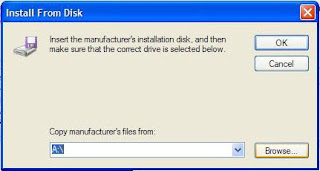
13.then select all drivers on the next screen then make sure you uncheck the "show compatible drivers" box, select have disk

--------------------------------------------------
14. then select browse:

15. Point to the 19040 folder, open the folder and 190.40 folder and select the nv4_disp.inf. press ok and continue with on screen instructions until finish and restart.

Compilations from:
- http://staff.prairiesouth.ca/knowledgebase/node/42
- BCCOMP: http://www.techsupportforum.com/hardware-support/driver-support/409157-solved-dell-xps13-driver-xp.html
p/s: Million thanks to the people who discussed this in forum especially to BCCOMP.
HP Pavilion dv4-1257tx Windows XP Driver
Please Install Netframework before others:
Net framework 2.0
Download
INTEL CHIPSET:
Intel Chipset Installation Utility for ICH9m
Download (intel website)
Download(mediafire)
AUDIO:
Install MS-UAA first:
both ms-uaa sp33867 and kb888111 are similar files.
Windows XP SP2: Download (SP33867.exe)
Download (KB888111)
Windows XP SP3: Download (KB835221)
Then restart, and install AUDIO Drivers:
IDT - High Definition Audio Codecs (SP39671)
Download (ftp)
Download (mediafire)
or
SP41616 Download(ftp)
Download (mediaifre)
Download and install the driver(do this to extract driver files), you will get the error while installing.
Perform the below steps to fix the issue.
1. Click on Start and select Run. Now type devmgmt.msc and press enter.
2. Right click on "Audio device on High Definition Audio Bus" and click Update driver.
3. Select "Install from a list or specific location".
4. Click Next. Then select "Don't search, I will choose the driver to install".
5. Click Next and then select "Sound, video and game controller" from the list.
6. Click Next and then click Have Disk.
7. Click Browse C:\swsetup\SP39671 folder and select the .inf file and click open and Continue with the onscreen instructions.
Manually install Audio Drivers.
GRAPHIC:
NVIDIA GeForce G 103M/ G 105M Graphics Driver (186.81 WHQL XP 32-bit)
Download
if resulting in error use modded driver below:
Download
3-step process to install:
1. Download driver, double click and select extract,
2. Download modded INF and replace original INF in extracted folder,
3. Install & reboot.
LAN/EHERNET
Realtek RTL8102E/8111C Family PCI-E Gigabit Ethernet NIC Driver
Download
WIRELESS:
If you have broadcom wireless:
Broadcom: Download
If you have intel wireless
Intel: Download
(requires windows installer 3.0 installed first)
BROADBAND
Qualcomm Mobile Broadband Drivers - Gobi1000
Download
HP Connection Manager
Download
HP Connection Manager 3.0 APN Patch
Download
BLUETOOTH:
HP Integrated Module with Bluetooth Wireless Technology
Download
HP Wireless Assitant:
Download
MODEM:
High-Definition Audio (HDA) Modem Driver
Download
HP Wireless Assistant
Download (direct)
Download (HP)
HP Quicklaunch Button
Download (direct)
CARD READER
JMB38X Card Reader Host Controller
Download
WEBCAM
Cyberlink youcam software 2.0
Download
INFRARED
ENE-CIR Reciever:
Download
Net framework 2.0
Download
INTEL CHIPSET:
Intel Chipset Installation Utility for ICH9m
Download (intel website)
Download(mediafire)
AUDIO:
Install MS-UAA first:
both ms-uaa sp33867 and kb888111 are similar files.
Windows XP SP2: Download (SP33867.exe)
Download (KB888111)
Windows XP SP3: Download (KB835221)
Then restart, and install AUDIO Drivers:
IDT - High Definition Audio Codecs (SP39671)
Download (ftp)
Download (mediafire)
or
SP41616 Download(ftp)
Download (mediaifre)
Download and install the driver(do this to extract driver files), you will get the error while installing.
Perform the below steps to fix the issue.
1. Click on Start and select Run. Now type devmgmt.msc and press enter.
2. Right click on "Audio device on High Definition Audio Bus" and click Update driver.
3. Select "Install from a list or specific location".
4. Click Next. Then select "Don't search, I will choose the driver to install".
5. Click Next and then select "Sound, video and game controller" from the list.
6. Click Next and then click Have Disk.
7. Click Browse C:\swsetup\SP39671 folder and select the .inf file and click open and Continue with the onscreen instructions.
Manually install Audio Drivers.
GRAPHIC:
NVIDIA GeForce G 103M/ G 105M Graphics Driver (186.81 WHQL XP 32-bit)
Download
if resulting in error use modded driver below:
Download
3-step process to install:
1. Download driver, double click and select extract,
2. Download modded INF and replace original INF in extracted folder,
3. Install & reboot.
LAN/EHERNET
Realtek RTL8102E/8111C Family PCI-E Gigabit Ethernet NIC Driver
Download
WIRELESS:
If you have broadcom wireless:
Broadcom: Download
If you have intel wireless
Intel: Download
(requires windows installer 3.0 installed first)
BROADBAND
Qualcomm Mobile Broadband Drivers - Gobi1000
Download
HP Connection Manager
Download
HP Connection Manager 3.0 APN Patch
Download
BLUETOOTH:
HP Integrated Module with Bluetooth Wireless Technology
Download
HP Wireless Assitant:
Download
MODEM:
High-Definition Audio (HDA) Modem Driver
Download
HP Wireless Assistant
Download (direct)
Download (HP)
HP Quicklaunch Button
Download (direct)
CARD READER
JMB38X Card Reader Host Controller
Download
WEBCAM
Cyberlink youcam software 2.0
Download
INFRARED
ENE-CIR Reciever:
Download
Compaq Presario V3918LA Windows Vista Driver
AUDIO:
Conexant High-Definition SmartAudio 221 Driver
GRAPHIC:
NVIDIA MCP67M Graphics/Video Driver
Download
TOUCHPAD:
ALPS Touchpad Pointing Device Driver
Download
FINGERPRINT DRIVER:
AuthenTec Inc. AES2501A Fingerprint Driver
Download
FINGERPRINT SOFTWARE:
DigitalPersona Fingerprint Software for Microsoft Windows Vista (32-bit)
Download
CARD READER:
Ricoh Media Card Reader Host Controller Driver
Download
TV TUNER:
HP Digital/Analog TV Tuner Driver Software
Download
MODEM DRIVER:
Conexant HDAUDIO Soft Data Fax Modem with SmartCP Driver
Download
NIS 2008 Modem Compatibility Update
Download
WIRELESS
Broadcom Wireless LAN Driver for Microsoft Windows Vista
Download
BLUETOOTH
Software Support for HP Integrated Module with Bluetooth Wireless Technology (Microsoft Windows Vista)
Download
QUICKPLAY:
HP QuickPlay Web Update
DOwnload
LIGHTSCRIBE
LightScribe Host Software
Download
WEBCAM/CAMERA:
Cyberlink YouCam Software
Download
QUICKTOUCH:
HP QuickTouch Software
Download
Conexant High-Definition SmartAudio 221 Driver
GRAPHIC:
NVIDIA MCP67M Graphics/Video Driver
Download
TOUCHPAD:
ALPS Touchpad Pointing Device Driver
Download
FINGERPRINT DRIVER:
AuthenTec Inc. AES2501A Fingerprint Driver
Download
FINGERPRINT SOFTWARE:
DigitalPersona Fingerprint Software for Microsoft Windows Vista (32-bit)
Download
CARD READER:
Ricoh Media Card Reader Host Controller Driver
Download
TV TUNER:
HP Digital/Analog TV Tuner Driver Software
Download
MODEM DRIVER:
Conexant HDAUDIO Soft Data Fax Modem with SmartCP Driver
Download
NIS 2008 Modem Compatibility Update
Download
WIRELESS
Broadcom Wireless LAN Driver for Microsoft Windows Vista
Download
BLUETOOTH
Software Support for HP Integrated Module with Bluetooth Wireless Technology (Microsoft Windows Vista)
Download
QUICKPLAY:
HP QuickPlay Web Update
DOwnload
LIGHTSCRIBE
LightScribe Host Software
Download
WEBCAM/CAMERA:
Cyberlink YouCam Software
Download
QUICKTOUCH:
HP QuickTouch Software
Download
Compaq Presario V3918LA Windows XP Driver
CHIPSET:
Nvidia nForce 630a - Windows XP/2000
Download
NVDIA GRAPHIC:
Nvidia MCP67M Graphics/Video Driver
Nvidia 32bit ForceWare GeForce Go 156.55
(NVIDIA GeForce Go 7150M)
Download
TOUCHPAD:
Alps Touchpad:
Download
CARD READER
Ricoh 5 in 1 Card Reader:
Download
(INSTALL NET FRAMEWORK FIRST BEFORE INSTALLING HP Quick Launch)
NET FRAMEWORK:
Download
HP Quick Launch:
Download
SOUND DRIVER:
MS UAA(required with a reboot before Conexant):
DOWNLOAD or Download
Conexant SmartAudio 221:
DOWNLOAD or Dowload
Use this for audio.Unzip to a folder.Run installer.if it errors use Device Manager.
RIGHT CLICK MY COMPUTER>MANAGE>DEVICE MANAGER
From Device Manager,right click "Audio Device on HD",choose Update driver,
No to connect,
Install from a list or specific location,
Select Don't Search, I will choose the driver to install,
For the Hardware Type select 'Show All Devices'
Remove the check from "Show Compatible Hardware" and click on "Have Disk".
Next...browse to the unzipped folder and choose the "WiSVHe5.inf".
Ignore XP when it complains.
Reboot.
---------------------------------------------------------------------------------
MODEM DRIVERS:
Conexant HDAUDIO Soft Data Fax Modem with SmartCP Driver:
Download
WIRELESS:
=======================
If you have intel wireless
Intel: Download
(requires windows installer 3.0 installed first)
If you have Atheros wireless
Wireless Atheros AR5009:
Download
Broadcom Wireless LAN Driver:
Download
or
DOWNLOAD
===================================
BLUETOOTH:
HP Integrated Module with Bluetooth Wireless Technology
Download
HP Wireless Assitant:
Download
LAN/ETHERNET:
(Realtek RTL8139/810x Family Fast Ethernet NIC Driver)
Download
Alternate download link:
Download
Or
Download
Ricoh 5-in-1 Card Reader Host Controller:
Download
WEBCAM
Cyberlink youcam software 2.0
Download
LIGHTSCRIBE:
Lightscribe system software
Download
Nvidia nForce 630a - Windows XP/2000
Download
NVDIA GRAPHIC:
Nvidia MCP67M Graphics/Video Driver
Nvidia 32bit ForceWare GeForce Go 156.55
(NVIDIA GeForce Go 7150M)
Download
TOUCHPAD:
Alps Touchpad:
Download
CARD READER
Ricoh 5 in 1 Card Reader:
Download
(INSTALL NET FRAMEWORK FIRST BEFORE INSTALLING HP Quick Launch)
NET FRAMEWORK:
Download
HP Quick Launch:
Download
SOUND DRIVER:
MS UAA(required with a reboot before Conexant):
DOWNLOAD or Download
Conexant SmartAudio 221:
DOWNLOAD or Dowload
Use this for audio.Unzip to a folder.Run installer.if it errors use Device Manager.
RIGHT CLICK MY COMPUTER>MANAGE>DEVICE MANAGER
From Device Manager,right click "Audio Device on HD",choose Update driver,
No to connect,
Install from a list or specific location,
Select Don't Search, I will choose the driver to install,
For the Hardware Type select 'Show All Devices'
Remove the check from "Show Compatible Hardware" and click on "Have Disk".
Next...browse to the unzipped folder and choose the "WiSVHe5.inf".
Ignore XP when it complains.
Reboot.
---------------------------------------------------------------------------------
MODEM DRIVERS:
Conexant HDAUDIO Soft Data Fax Modem with SmartCP Driver:
Download
WIRELESS:
=======================
If you have intel wireless
Intel: Download
(requires windows installer 3.0 installed first)
If you have Atheros wireless
Wireless Atheros AR5009:
Download
Broadcom Wireless LAN Driver:
Download
or
DOWNLOAD
===================================
BLUETOOTH:
HP Integrated Module with Bluetooth Wireless Technology
Download
HP Wireless Assitant:
Download
LAN/ETHERNET:
(Realtek RTL8139/810x Family Fast Ethernet NIC Driver)
Download
Alternate download link:
Download
Or
Download
Ricoh 5-in-1 Card Reader Host Controller:
Download
WEBCAM
Cyberlink youcam software 2.0
Download
LIGHTSCRIBE:
Lightscribe system software
Download
Subscribe to:
Posts (Atom)