Audio driver
Windows XP
(Download) (Mirror)
Chipset driver
Windows XP
(Download) (Mirror)
LAN driver
Windows XP
(Download) (Mirror)
Modem driver
Windows XP
(Download) (Mirror)

Tuesday, December 23, 2008

Acer Aspire 5735 - 5735Z Windows XP Drivers
INTEL CHIPSET:
Chipset Intel
(Download) (Mirror)
VGA/GRAPHICS/VIDEO:
VGA Intel
(Download) (Mirror)
WEBCAM DRIVERS:
(note: there are several issue might appear such as onlione webcam so here choose the proper driver and if you didn't know which to choose i suggest to install suyin)
Webcam Suyin
(Download) (Mirror)
Webcam Bison
(Download) (Mirror)
WIRELESS DRIVERS:
if you have attheros:
Wireless Atheros XB63
(Download)
Wireless Foxconn Atheros AR5B91
(Download) (Mirror)
Wireless Foxconn Ralink
(Download) (Mirror)
if you have broadcom
Wireless Broadcom
(Download) (Mirror)
Wireless Intel Shirley Peak
(Download)
Wireless QMI Atheros AR5B91
Windows XP Acer Aspire 5735 - 5735z
(Download) (Mirror)
(note: choose one only base on your specs if you have Intel make it strongly recommended to isntall microsoft windows installer 3.1)
BLUETOOTH
Bluetooth Broadcom
(Download)
AUDIO DRIVER
Realtek Audio Driver
(Download)
CARD READER
Card Reader Realtek
(Download)
MODEM
Modem Foxconn Conexant
Windows XP Acer Aspire 5735 - 5735z
(Download) (Mirror)
Modem Foxconn LSI
Windows XP Acer Aspire 5735 - 5735z
(Download) (Mirror)
LAN/ETHERNET
LAN Marvell
Windows XP Acer Aspire 5735 - 5735z
(Download) (Mirror)
OTHERS
Launch Manager
Windows XP Acer Aspire 5735 - 5735z
(Download) (Mirror)
Touchpad Synaptics
Windows XP Acer Aspire 5735 - 5735z
(Download) (Mirror)
Intel Matrix Storage Manager
Windows XP Acer Aspire 5735 - 5735z
(Download)
original source: http://komku.blogspot.com/
Chipset Intel
(Download) (Mirror)
VGA/GRAPHICS/VIDEO:
VGA Intel
(Download) (Mirror)
WEBCAM DRIVERS:
(note: there are several issue might appear such as onlione webcam so here choose the proper driver and if you didn't know which to choose i suggest to install suyin)
Webcam Suyin
(Download) (Mirror)
Webcam Bison
(Download) (Mirror)
WIRELESS DRIVERS:
if you have attheros:
Wireless Atheros XB63
(Download)
Wireless Foxconn Atheros AR5B91
(Download) (Mirror)
Wireless Foxconn Ralink
(Download) (Mirror)
if you have broadcom
Wireless Broadcom
(Download) (Mirror)
Wireless Intel Shirley Peak
(Download)
Wireless QMI Atheros AR5B91
Windows XP Acer Aspire 5735 - 5735z
(Download) (Mirror)
(note: choose one only base on your specs if you have Intel make it strongly recommended to isntall microsoft windows installer 3.1)
BLUETOOTH
Bluetooth Broadcom
(Download)
AUDIO DRIVER
Realtek Audio Driver
(Download)
CARD READER
Card Reader Realtek
(Download)
MODEM
Modem Foxconn Conexant
Windows XP Acer Aspire 5735 - 5735z
(Download) (Mirror)
Modem Foxconn LSI
Windows XP Acer Aspire 5735 - 5735z
(Download) (Mirror)
LAN/ETHERNET
LAN Marvell
Windows XP Acer Aspire 5735 - 5735z
(Download) (Mirror)
OTHERS
Launch Manager
Windows XP Acer Aspire 5735 - 5735z
(Download) (Mirror)
Touchpad Synaptics
Windows XP Acer Aspire 5735 - 5735z
(Download) (Mirror)
Intel Matrix Storage Manager
Windows XP Acer Aspire 5735 - 5735z
(Download)
original source: http://komku.blogspot.com/
Monday, December 22, 2008
Laptop Temperature - How to check your computer temperature
One of the best full free software to check your computer temperature is by using Speedfan. By using this software it will display your fan speed and the temperature of your hardisk and core temperature.
Why should you check the temperature? good temperature awareness and control can affect your computer/laptop performance and its lifespan. Beside that very high temperature will cause system failure and your laptop or computer will restart automatically.
How to make it cooler.
For desktop there are many types of cooler and it is easy to add fan because the large casing. For laptop you can buy the normal laptop fan. For normal laptop fan the power came from the usb which you stick in your usb. My friend change it by connect it with the normal power supply and the fan speed amazingly increase. But if you connected the power of the fan with the power supply remove the original usb connector. If you connect it even you already connect with the power supply it will cause your usb socket not working anymore.
Why should you check the temperature? good temperature awareness and control can affect your computer/laptop performance and its lifespan. Beside that very high temperature will cause system failure and your laptop or computer will restart automatically.
How to make it cooler.
For desktop there are many types of cooler and it is easy to add fan because the large casing. For laptop you can buy the normal laptop fan. For normal laptop fan the power came from the usb which you stick in your usb. My friend change it by connect it with the normal power supply and the fan speed amazingly increase. But if you connected the power of the fan with the power supply remove the original usb connector. If you connect it even you already connect with the power supply it will cause your usb socket not working anymore.
Saturday, September 6, 2008
System restore
If yesterday your laptop works well but now it lost some function/ or affected by virus/ or having problems like unstable system = system restore is one of the best options you can choose to try solve the problems.
How to do it?
Click start > all program >accessories > system tools > system restore.
 And then after clicking next you will see many date where you can choose to restore. Choose any of them(for me choose the date where computer in good performance is better).
Remember to back up your files in C.
what is the effect: It UNDO the change made to your system and restore the earlier system.
How to do it?
Click start > all program >accessories > system tools > system restore.
 And then after clicking next you will see many date where you can choose to restore. Choose any of them(for me choose the date where computer in good performance is better).
Remember to back up your files in C.
what is the effect: It UNDO the change made to your system and restore the earlier system.
Install Windows XP on SATA without a Floppy
"to erase Win Vi$sta and install XP instead. But the hard disk is SATA, and the required driver is not available in the XP setup disk. Thus when following the F6 install procedure, the installation program asks for the driver in a FDD. This machine does not have a FDD unit."
Its a big problems to install windows xp if you do not have floopy. The original article i read about this is from softpedia but i just want to make it simple here. just simple step by step instruction.
1. Download Nlite via Softpedia
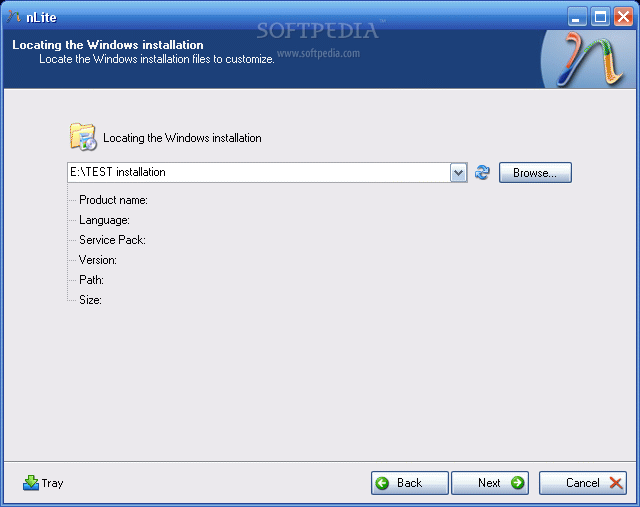
-download the drivers and unzip them (in case they come archived) in a desired location. Then download and install the Nlite application. When you start the Nlite application, you will be asked to provide the location for the Windows installation package. Insert the genuine Windows Installation CD into the CD drive and, inside the application, select the CD drive letter.
2.
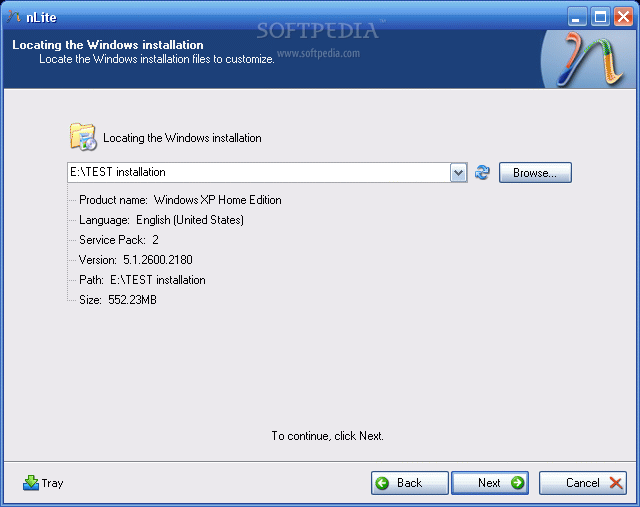
To insert the SATA drivers within the installation package, you need to have it saved on the HDD. Hence, when the warning window appears click OK and select the destination folder for the files to be saved. Make sure that the destination partition / HDD has enough space to store the contents of the installation CD. Immediately after you have chosen the destination folder, the application will start copying the Windows installation files. When finished, it will display some version information regarding the newly copied Windows Installation Package.
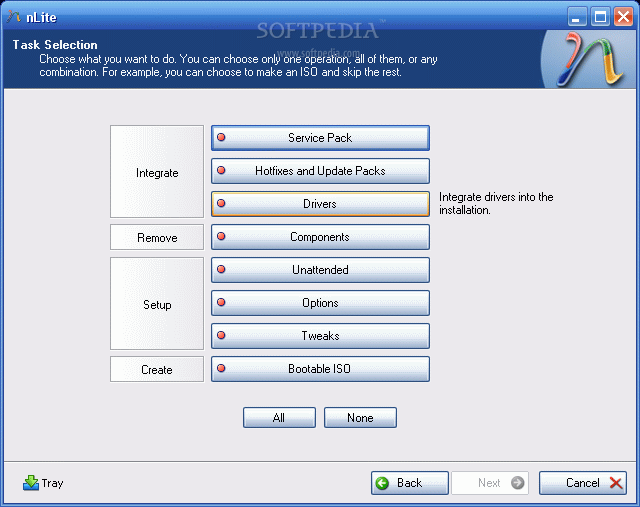
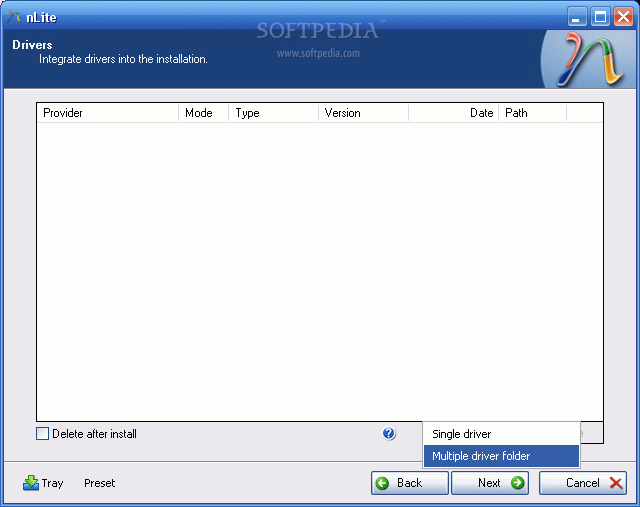
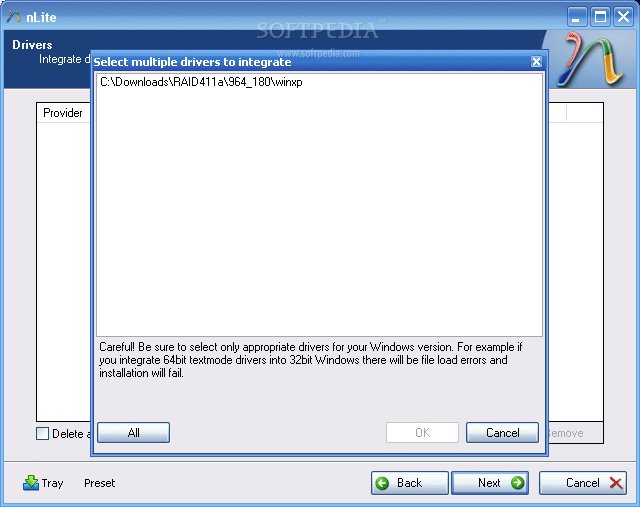
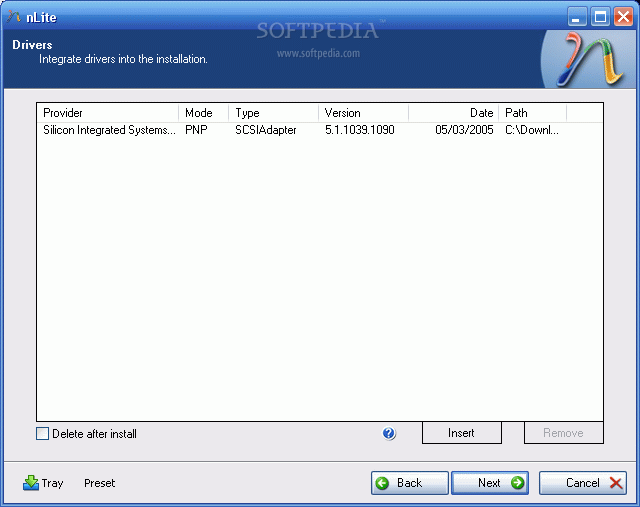
3. Now, click next twice until you get to a screen where you get options sorted in 4 categories: Integrate, Remove, Setup, Create. We are interested in the integration procedure, therefore select the Drivers button and click next. From the next menu window, click Insert and select multiple drive folder option from the drop down menu. This option permits you to browse to the location where the downloaded drivers are found.
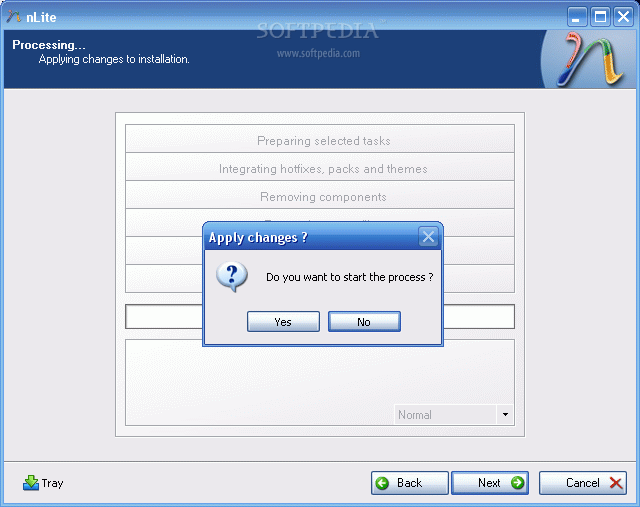
Select the containing directory and click next. You will get a list with the available drivers (in case there are more than one) or simply one driver. Select it (them) and click next. Now the application will ask for the permission to start the integration procedure. Choose Yes and wait for the drivers to be inserted into the installation package.
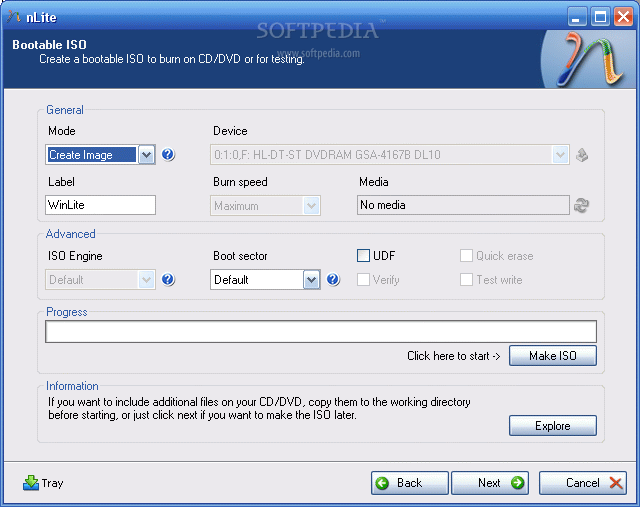
With problematic driver being included in the installation package you can install Windows XP on your SATA HDD...but...the installation package is on the HDD. You need a bootable CD in order to start an installation. Don't worry, once the installation package has been adorned with additional user selected drivers it can be transformed into a bootable disk image and later burned on a CD. To encapsulate the installation into a ISO image use the same Nlite application.
Open it, make sure the HDD installation folder is selected and click next. Select "Last session" preset and click next again. Now from the options menu choose Bootable ISO and click next. In the following window, make sure that the mode is set to "Create Image" and click Make ISO. A destination folder is required where the resulting ISO image will be saved. Once the image saving process finished you have the freedom to burn it on a blank CD with whatever you favorite CD burner software may be.
The new CD will be the twin copy of the Windows Installation CD but with one difference, it includes the SATA driver.
Its a big problems to install windows xp if you do not have floopy. The original article i read about this is from softpedia but i just want to make it simple here. just simple step by step instruction.
1. Download Nlite via Softpedia
-download the drivers and unzip them (in case they come archived) in a desired location. Then download and install the Nlite application. When you start the Nlite application, you will be asked to provide the location for the Windows installation package. Insert the genuine Windows Installation CD into the CD drive and, inside the application, select the CD drive letter.
2.
To insert the SATA drivers within the installation package, you need to have it saved on the HDD. Hence, when the warning window appears click OK and select the destination folder for the files to be saved. Make sure that the destination partition / HDD has enough space to store the contents of the installation CD. Immediately after you have chosen the destination folder, the application will start copying the Windows installation files. When finished, it will display some version information regarding the newly copied Windows Installation Package.
3. Now, click next twice until you get to a screen where you get options sorted in 4 categories: Integrate, Remove, Setup, Create. We are interested in the integration procedure, therefore select the Drivers button and click next. From the next menu window, click Insert and select multiple drive folder option from the drop down menu. This option permits you to browse to the location where the downloaded drivers are found.
Select the containing directory and click next. You will get a list with the available drivers (in case there are more than one) or simply one driver. Select it (them) and click next. Now the application will ask for the permission to start the integration procedure. Choose Yes and wait for the drivers to be inserted into the installation package.
 |  |  |  |  |
 |  |  |  |
With problematic driver being included in the installation package you can install Windows XP on your SATA HDD...but...the installation package is on the HDD. You need a bootable CD in order to start an installation. Don't worry, once the installation package has been adorned with additional user selected drivers it can be transformed into a bootable disk image and later burned on a CD. To encapsulate the installation into a ISO image use the same Nlite application.
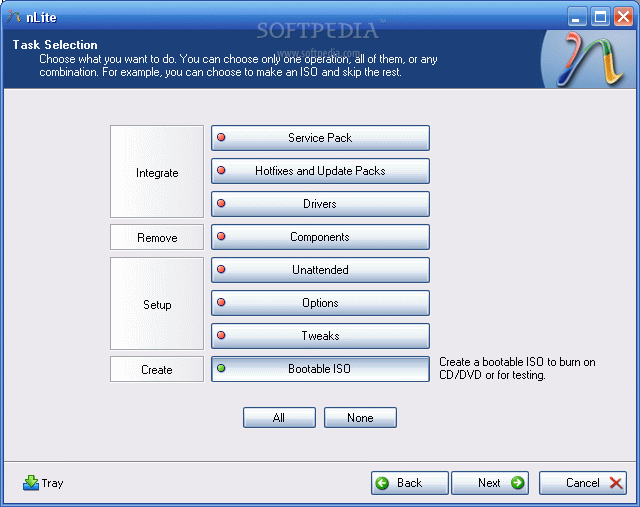
Open it, make sure the HDD installation folder is selected and click next. Select "Last session" preset and click next again. Now from the options menu choose Bootable ISO and click next. In the following window, make sure that the mode is set to "Create Image" and click Make ISO. A destination folder is required where the resulting ISO image will be saved. Once the image saving process finished you have the freedom to burn it on a blank CD with whatever you favorite CD burner software may be.
 |  |
The new CD will be the twin copy of the Windows Installation CD but with one difference, it includes the SATA driver.
Compaq Presario V3828AU driver for xp
NVIDIA nForce 630M Chipset:
http://us.download.nvidia.com/Windows/nForce/650i/8.43_nforce_650i_winxp...
Video: NVIDIA GeForce 7150M:
http://drivers.softpedia.com/get/GRAPHICS-BOARD/NVIDIA/NVIDIA-32bit-Forc...
OR
http://us.download.nvidia.com/Windows/163.71/163.71_forceware_winxp_32bi...
NOTE: The URL above will take you to a non HP Web site. HP does not control and is not responsible for information outside of the HP Web site.
Alps Touchpad Driver Download link:
ftp://ftp.hp.com/pub/softpaq/sp36501-37000/sp36510.exe
HP Quick Launch Buttons:
ftp://ftp.hp.com/pub/softlib/software8/COL18360/ch-47422-1/sp33258.exe
Ricoh 5-in-1 Card Reader Host Controller:
ftp://ftp.hp.com/pub/softpaq/sp32501-33000/sp32825.exe
Broadcom Wireless LAN Driver:
ftp://ftp.hp.com/pub/softpaq/sp31001-31500/sp31466.exe
Network Drivers ( LAN) :
http://www.sendspace.com/file/4s15q0
Alternate network Drivers: Realtek RTL8139/810x Family Fast Ethernet NIC
ftp://ftp.hp.com/pub/softpaq/sp36001-36500/sp36407.exe
Or
ftp://ftp.hp.com/pub/softpaq/sp32001-32500/sp32131.exe
Installation Instructions :
1. Download the file to a directory on your hard drive.
2. Execute the downloaded file and follow the on-screen instructions.
3. Restart the notebook when the installation is complete.
Audio Driver:
In order to install the High definition audio driver we must install Microsoft HD driver. Microsoft Universal Audio Architecture (UAA) Bus Driver for High Definition Audio :
ftp://ftp.hp.com/pub/softpaq/sp33501-34000/sp33566.exe
NOTE: Please do not click on the link. Copy the full link and paste it to
the address bar of a new browser Window and try to open it.
Installation Instructions
1. Download the file to a directory on your hard drive.
2. Execute the downloaded file and follow the on-screen instructions.
Then restart the notebook to install Audio driver
Conexant High Definition Audio Drive:
ftp://ftp.hp.com/pub/softpaq/sp36001-36500/sp36408.exe
Note: Please copy the entire link starting from "ftp" to "exe" and paste it in the address bar of the browser in your computer and press enter.
1. Click on Start and select Run. Now type devmgmt.msc and press enter.
2. Right click on "Audio device on High Definition Audio Bus" and click Update driver.
3. Select "Install from a list or specific location"
4. Click Next. Then select "Don't search, I will choose the driver to install"
5. Click Next and then select "Sound, video and game controller" from the list.
6. Click Next and then click Have Disk.
7. Click Browse C:\swsetup\sp36408 folder and the double click the V32 folder. Select the .inf file, click open and Continue with the onscreen instructions.
Similarly install Modem Drivers:
Conexant HDAUDIO Soft Data Fax Modem with SmartCP drivers:
ftp://ftp.hp.com/pub/softpaq/sp33501-34000/sp33890.exe
1. Right click on "Modem device on High Definition Audio Bus" and click Update driver.
2. Select "Install from a list or specific location"
3. Click Next. Then select "Don't search, I will choose the driver to install"
4. Click Next and then select "Modem" from the list.
5. Click Next and then click Have Disk.
6. Click Browse C:\swsetup\sp33890 folder and select the .inf (wis30b2b) file and click open and Continue with the onscreen instructions.
Software and Drivers for HP Integrated Module with Bluetooth Wireless :
ftp://ftp.hp.com/pub/softpaq/sp32501-33000/sp32883.exe
CyberLink YouCam :
http://www.cyberlink.com/multi/download/trials_125_ENU.html
Installation Instructions :
1. Download the spXXXXX.EXE file to a directory on your hard drive.
2. Execute the downloaded file and follow the on-screen instructions.
3. Restart the notebook when the installation is complete.
original source: http://www.zyxware.com
Subscribe to:
Posts (Atom)